Scheduling software for your teams and equipment

Schedule your teams, technicians and equipment on a single shared calendar in real time, from one to several thousand resources. Online with PlanningPME Web, or installed with PlanningPME Desktop.
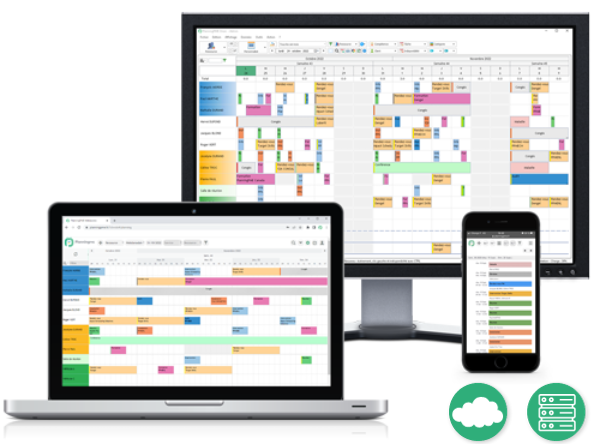
Scheduling solutions - On-Premise and Cloud

Published by Target Skills since 2002


Since
years


In
countries


Join our
customers


SME

Our customers - SME

Mid-size companies

Our customers - Mid-size companies

Large groups

Our customers - Large groups

For over 20 years, more than 6,000 companies in nearly 50 countries have scheduled with PlanningPME, from small businesses to large enterprises. This scheduling software adapts to the needs of every organization, whatever its industry. Manufacturing, services, construction, healthcare or local government: every day, these companies rely on PlanningPME to organize their teams, optimize resource management and plan ahead.

Schedule management is now easy

Do you schedule in Excel, but your needs are getting more complex? Switch to forecast scheduling software, installed on your PC or used through our online scheduler. You plan your team's work week and see everyone's calendar.

Manage your human and material resources, time off, appointments, projects and schedules. PlanningPME adapts to every industry: construction, government, manufacturing, automotive. You track each team's workload and optimize your profitability.

Simple, intuitive scheduling

Whatever your role in the company, managing scheduling is quick and intuitive.

Multi-platform access

Different versions of the scheduling software are available: software, web, smartphone and tablet app.

Managing tasks and resources

Your data is centralized in the scheduling software and can be shared with your colleagues.

Alerts and notifications

Keep your resources up-to-date in real time of any changes that arise in their schedule.

Reports and statistics

Create customized reports and analyze your activity in order to improve profitability.

Users rights

Manage your appointments in an efficient way thanks to an improved visualization of your co-workers calendar.

Why choose PlanningPME?

Your teams and equipment on a single schedule. Technicians, trainers, rooms, vehicles, machines: PlanningPME schedules human and material resources together. You see who is available, with which equipment, and an alert warns you before a double booking.

A clear schedule, even at large scale. Whether you schedule a single resource or several thousand, filter the schedule by department, skill or task type, and display it by day, week, month or year.

Transparent pricing, no surprises. PlanningPME Web, as SaaS or On Premise, is billed according to the number of scheduled resources, with unlimited users. PlanningPME Desktop is offered as a license. Check our pricing to find the plan that fits your company.

Want to compare before you choose? See our comparison of scheduling software and their prices.


Scheduling software that is customizable for all industry sectors

PlanningPME adapts to every company, whatever its industry. Fully customizable, our scheduling tool manages tasks, work schedules, projects, appointments and employee absences. Your teams become more efficient. You manage everyone's workload and improve the company's profitability.

ADMINISTRATION

REAL ESTATE

SECURITY

CONSTRUCTION

TRANSPORT

HEALTH

SERVICES

LEGAL

IT

AUTOMOTIVE

ENGINEERING

MEDIAS

NPO

ENVIRONMENT

MANUFACTURING

AGRICULTURE

TRAINING

TRADE

INDUSTRY

RENTING

CULTURE

Scheduling examples

Whether you need to manage your resources, trainings or projects, learn how to optimize the management of your business every day with our scheduling templates. Do not wait to discover how to increase efficiency and productivity with PlanningPME!

Our scheduling solutions

PlanningPME Desktop

  • Shared scheduling over the company network
  • Human and Material Resource management
  • Schedule your meetings, projects and all kinds of tasks

PlanningPME Web

  • A permanent access to your online schedules
  • Secure data on our reliable servers
  • An improvement of remote work

Features

PlanningPME is a comprehensive scheduling tool that will help you optimize daily management of your resources, customers, training sessions, projects or any other scheduling needs. Here are some of the available features: from filters to different views and even reports and notifications, your schedule will become your best ally!

Day-to-day scheduling views

Visualize at any time your company work schedule due to various detailed views: daily, weekly, monthly, annual schedules, and calendar view.

Easy-to-use

The intuitive scheduling software PlanningPME can be handled quickly and efficiently: schedule your appointments and holidays in a few clicks. Save time due to features like drag an drop, copy/paste, recurring bookings.

Departments management

Define your company departments to improve visibility. Filter the schedule by department, give users specific access to one or several departments.

Workload

Optimize your resources workload (employees and facilities) thanks to real-time indicators.

E-mail and notifications

Several kinds of notifications are available: e-mailing to resources when a task is assigned to them, task reminder notifications directly on the schedule, task notification using dots.

Leaves and days off

Schedule holidays and other unavailabilities easily: Know at any time the number of days off per employee, be notified of your staff holidays so you can forecast peak periods.

Print

Print any kind of report. Depending on the platform you’re using, you can print various views, such as daily, weekly, monthly, yearly graphic schedule, or operational schedule per resource, client, task and so on.

Data import/export - API

In order to avoid typos and be more efficient, you can import any kind of information into your schedule. Our scheduling software not only includes import and export functionnalities, but also enables you to integrate data from other ERPs by using specific scripts. The API, a connection interface with your other software, links PlanningPME Web to your ERP or in-house tools.

User rights

Set up specific access rights per user in order to restrict the persmission on your schedule: some resources will only be allowed to create tasks and unavailabilities, others might only be allowed to view one or several services. Managing access rights also allows a better monitoring of your scheduling: this allows you to know which user made which changes to your schedule.

History and follow up

Access history of tasks and event on the schedule: this enables you to find out which user created, changed or deleted a task. Depending on the options activated in your schedule, you can also access the history of any task completed for a client, project or resource.

Recurrent bookings

Manage recurrent tasks at a glance : weekly appointments, monthly meetings or annual contracts.

Universal access (Software, Web, Mobile)

PlanningPME Desktop installs on Windows. PlanningPME Web opens in your browser, on a computer, smartphone or tablet (iPhone, iPad, Android).

Filters

Apply filters on your schedule to extract the most relevant information: display resources from a specific service, filter tasks depending on their categories, display an “agenda” or “list” view or filter the scheduling view to display a daily, weekly, monthly or yearly timetable.

Human and/or material resources

Manage your human resources (employees, administrative staff, technicians, trainers, security officers, medical staff…) and your material resources (meeting rooms, company cars, shared equipments…). Create individual records for each resource, specifying his/her weekly time profile, his/her work contract, his/her skills and any other personal information.

Customer management

Manage your own client database with our scheduling tool. Access the detailed record for each customer and check the history of scheduled events anytime. Optimize your productivity by e-mailing meeting requests confirmation to your client.

Project management

Optimize your project management: our easy to use and efficient project management tool will help you ensure a better follow up and improve team working efficiency. Most popular functionalities of our management tools include project view, filters, reports and workloads as well as Gantt charts.

Skill management

Qualify your human resources by assigning them skills according to specific skill domains. Assign resources to tasks requiring skills that are specific to each employee. Look for the availability of a resource with the required skills for a given task.

Reports and statistics

Many kinds of reports can be generated: number of hours worked per resource on a weekly or monthly basis, number of days off per employee and so on. Any information can be exported to Excel pivot tables, allowing the generation of custom report templates.

Schedule customization

Schedules are fully customisable: set data specific to your own business needs, display only scheduling information relevant to you and select colours of your choice.

Scheduling conflicts management

When several planners are scheduling the same resources at the same time it is hard to avoid scheduling conflicts. With PlanningPME it is possible to check for the availability of any resource by displaying a warning on the scheduling area if a resource is already busy with another task.

Go beyond your Excel spreadsheet to schedule your business activities!

Excel is a powerful spreadsheet, but when you need to schedule tasks for your staff, or have more complex needs, then you'll probably need to move to a dedicated online scheduling software for better collaborative work. Thus, exporting your data in calendar with Excel will allow you to keep your favorite spreadsheet program to analyze time management of your resources through pivot tables and optimize your workload while viewing your dashboards. Your existing data is not lost: you import your resources, customers and projects from your Excel files.

About us

TARGET SKILLS publishes and commercializes PlanningPME scheduling solutions. For the last 20 years, it relies on a network of resellers throughout the world to respond to the problems of optimizing company resources and to distribute its tools to professionals in all sectors.

Share your calendar and generate your schedule in Excel

Share a calendar on Outlook

You want to add your calendar PlanningPME in your favorite applications such as Outlook, Google Calendar, Thunderbird and iCal?
Now it is possible! Your agenda is available for consultation and synchronized on all your connected devices. A simple click is enough to subscribe, then follow the guide to discover how to share your calendar.
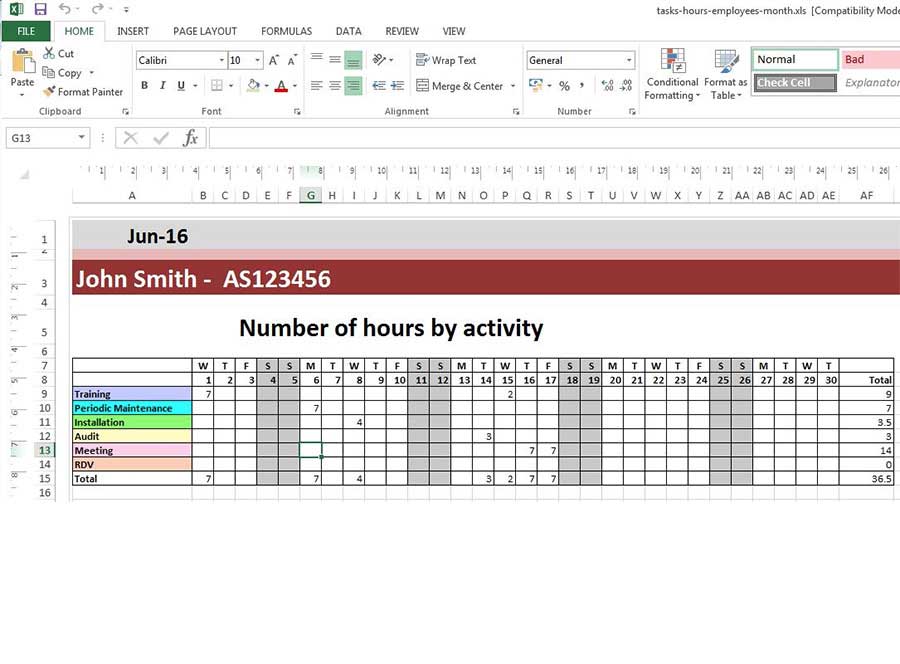
Excel scheduling template

"With our Excel scheduling templates, your data is exported to Excel and your schedule is generated instantly!
Information entered in PlanningPME is dynamically included, and you can reuse the models endlessly or create your own template. Do not wait any longer to use our Excel schedule templates!